
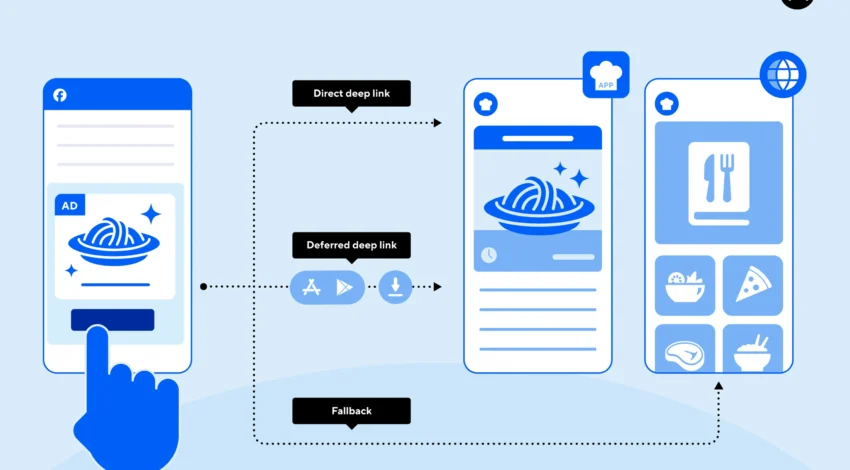
Robust deep linking turns notifications, emails, and web SEO into seamless in-app experiences. Done poorly, links dump users at the home screen or fail entirely after an update. The following blueprint standardizes how to design, implement, and monitor deep links across iOS and Android.
1) Unambiguous URL design
Start with stable, human-readable paths:
- Canonical pattern:
https://yourdomain.com/{locale?}/{entity}/{id-or-slug} - No opaque query soup: Prefer path parameters; reserve query keys for filters or tracking (
utm_). - Versioning: Avoid
/v2in public URLs; keep them evergreen and map changes in the app/router.
Create a route matrix documenting every path, supported parameters, required auth state, and expected fallback screen.
2) Platform bindings
iOS (Universal Links)
- Host an
apple-app-site-association(AASA) file athttps://yourdomain.com/.well-known/declaring the app’s bundle ID and allowed paths. - In Xcode, enable Associated Domains (
applinks:yourdomain.com), then implement scene-based continuation to receive the URL and route directly. - Universal Links bypass the browser when the app is installed; if not, Safari opens the web page—no interstitial required.
Android (App Links)
- Declare intent filters with
android:autoVerify="true"for each host/path. - Serve a Digital Asset Links JSON (
.well-known/assetlinks.json) mapping your domain to the app’s package and signing certificate. - Handle both verified App Links and generic
VIEWintents for backward compatibility.
3) Router and navigation contract
Centralize deep-link handling in a single router:
- Parse → authorize → navigate: Validate params, check auth/entitlements, then push the destination. Never navigate before validation.
- Idempotency: Make routes safe to open repeatedly (e.g., from multiple taps).
- Cold start vs warm: On cold start, hydrate minimal state, then route. Avoid blocking on full app initialization; show a skeleton of the target screen and backfill.
For multi-stack apps, add a cross-stack navigator to switch tabs/stacks before pushing the detail view.
4) Fallbacks and edge cases
- Not installed: Web opens the same canonical URL. Ensure the web page renders the equivalent view with a prominent, honest install CTA.
- Entity missing or private: Show a friendly error (or login wall) that preserves context and offers a retry after authentication.
- Expired campaigns: Redirect to a relevant parent screen (e.g., collection instead of a 404).
5) Attribution and privacy
- Strip PII from links. Use opaque tokens or short IDs; fetch sensitive data after auth.
- Normalize tracking parameters and map them to analytics events (
deep_link_opened,source=push/email/seo,campaign_id). - Respect OS privacy rules; never stuff secrets into URLs (they leak via referrers and screenshots).
6) Quality gates and monitoring
- Automated tests: Unit-test URL parsing; run UI tests that cold-launch the app with deep links for top routes.
- Link validator: A CI job that crawls your sitemap/campaign sheets, checks AASA/assetlinks presence, and verifies HTTP 200 + correct headers.
- Telemetry: Log success/failure, time-to-first-paint on destination, and “bounced to home” incidents with reasons.
7) Operational playbook
- Keep AASA/assetlinks under version control and deploy atomically with routing changes.
- When rotating signing keys (Android) or changing bundle IDs/associated domains (iOS), schedule a dual-publish window where both old and new associations are valid.
- Provide a universal fallback route in the app that can absorb unknown paths and guide users.
Bottom line: Treat deep linking as a contract between web, campaigns, and app navigation. Use Universal Links/App Links with verified domains, a single authoritative router, graceful fallbacks, and rigorous tests and telemetry. Users land where they expect—fast, reliable, and privacy-safe.


