
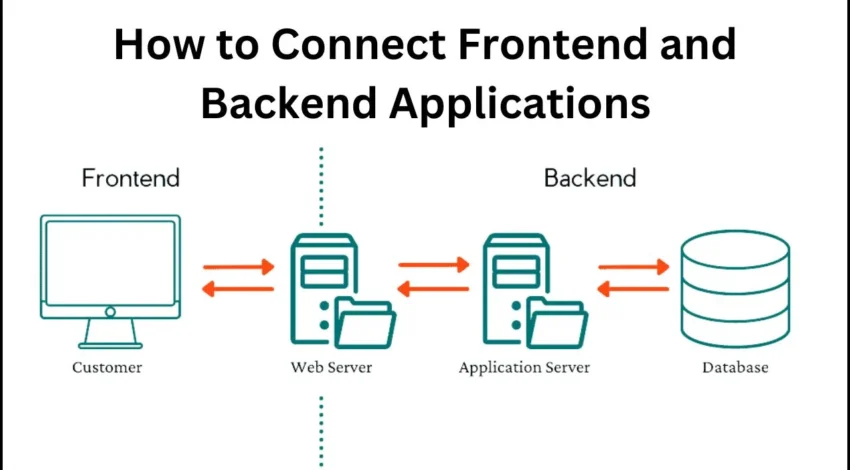
Modern products rarely have a single “frontend.” You’ll likely ship a marketing site, a React/Next.js web app, a mobile app, maybe even a watch widget. Forcing all of them to call the same generic “one-size-fits-none” API leads to brittle clients and sprawling glue code. Backends for Frontends (BFF) solve this by placing a thin, client-specific backend between each frontend and your internal services. Done well, BFFs shorten development cycles, harden security, and reduce over-the-wire waste.
Why a BFF instead of “just call the API”?
- Client-shaped payloads: Mobile might need smaller, paginated responses with aggressive caching; the web app might want expanded fields and server sorting.
- Latency hiding: BFF can fan-out to multiple microservices and return a single, aggregated response.
- Security boundary: Keep tokens, secrets, and PII joins off the device. Enforce authorization centrally.
- A/B & feature flags: Route cohorts to different backends or schemas without shipping client updates.
- Compliance & observability: Add audit logs, PII redaction, and request IDs at the boundary.
Reference architecture
- Frontend(s): Browser/Native clients talk only to their BFF.
- BFF layer: Small Node/Go/Java services per client surface (e.g.,
bff-web,bff-ios). - Service mesh / API gateway: AuthN, rate limits, mTLS, and routing to internal services.
- Domain services: Product, pricing, users, orders, search, etc.
- Data cache: Redis/Cloudflare KV for hot endpoints and token/session state.
Rule: One BFF per frontend type (web, mobile), not per screen. Keep it thin; if logic grows heavy, push it into domain services.
Responsibilities (and non-responsibilities)
BFF should:
- Aggregate/combine service calls into client-ready shapes.
- Enforce authorization and input validation.
- Apply caching (HTTP cache headers, ETags, stale-while-revalidate).
- Normalize errors and attach correlation IDs.
- Gate features (flags, experiments) and choose variants.
BFF should not:
- Contain business rules that other clients will need; move these to domain services.
- Transform data ad-hoc without contracts; publish schemas.
- Become a write-heavy stateful monolith.
Designing client-shaped endpoints
- Avoid chatty clients: Replace N calls with one aggregate endpoint.
- Support partial responses:
fields=summary,price,badgesor GraphQL selection sets to cut payload size. - Cursor pagination: Avoid offset pagination at scale; use stable cursors and sort keys.
- Deterministic sorting & filtering: Specify contract (case, locale, null ordering).
- Idempotent writes: Accept
Idempotency-Keyfor payment-like flows.
Example (REST aggregate)GET /v1/home-feed?fields=card,title,cta&limit=20&cursor=abc123
BFF fans out to recommendations, inventory, and pricing; returns a compact array of cards the UI can render immediately.
Caching strategy
- Public vs private: Public cache for anonymous pages; private cache keyed by user/session for dashboards.
- ETag + conditional GET: Reduce bandwidth; ensure stable entity hashing.
- SWR (stale-while-revalidate): Serve cached response instantly; refresh in the background.
- Surrogate keys/tags: Invalidate sets of objects (e.g., all
product:123pages) on updates. - Variant keys: Include critical headers (locale, currency) in the cache key to avoid mixing variants.
Auth, rate limiting, and abuse protection
- AuthN: Accept only httpOnly session cookies or signed tokens from the gateway; never trust device claims.
- AuthZ: Enforce role/tenant checks inside BFF; never leak fields a user can’t see.
- Rate limits: Per user/IP/tenant; soft-limit with headers (
X-RateLimit-Remaining), hard-block abusive clients. - Bot checks: Challenge at BFF (proof-of-work, risk scores) instead of sprinkling scripts on the client.
Schema governance (REST or GraphQL)
- Contracts as code: OpenAPI or GraphQL SDL in the repo; PR-reviewed.
- Backward compatibility: Additive changes only; deprecate fields with a timeline.
- Golden tests: Snapshot example responses; diff on CI to catch accidental shape changes.
- Versioning: Path (REST:
/v2/...) or field-level (GraphQL: deprecate + communicate). Keep versions few and short-lived.
Observability
- Structured logs: Include
request_id,user_id,tenant_id,feature_flags, and upstream timings. - Metrics: p50/p95 latency per route, error rates, upstream fan-out counts.
- Tracing: Propagate W3C trace context; one click from client request to DB calls.
- Dashboards: Compare web vs mobile latency; identify payload bloat and over-fetching.
Performance tactics
- n+1 killers: Batch or use data loaders; prefer server-side joins at BFF to multiple round-trips.
- Streaming: For long lists, stream JSON (SSE or chunked transfer) so UI can render incrementally.
- Compression & HTTP/3: Enable Brotli, set
Accept-Encodingcorrectly, and move to QUIC where supported. - Precomputation: Generate “ready-to-render” blocks for the most popular surfaces hourly; invalidate on change.
Security checklist
- Input validation (schema-driven); reject unknown fields.
- Output encoding; never pass HTML or script through unescaped.
- PII minimization; redact in logs.
- Strict CORS; BFF should be same-origin with your app.
- CSRF protection for cookie-based sessions (SameSite + tokens).
Anti-patterns
- “God BFF” for all clients: It will calcify quickly. Split by frontend type.
- Business logic creep: If multiple BFFs need the rule, it belongs in a domain service.
- Silent breaking changes: Contracts must be versioned and tested.
- Unbounded fan-out: Cap upstream calls; return partial data rather than timing out the whole page.
Bottom line: A BFF is not just a proxy—it’s a disciplined boundary that delivers client-ready data, enforces security, and keeps the rest of your system sane. Keep it thin, observable, and contract-driven.
Image & Video Optimization in 2025: Faster Pixels, Lower Costs, Happier Users
Media drives engagement—and can also wreck performance. Bloated images and videos crush Largest Contentful Paint (LCP), Interaction to Next Paint (INP), and your cloud bill. The good news: the tooling is mature. A well-tuned pipeline can cut medians by 40–70% with minimal effort.
Formats that matter now
- AVIF: Excellent compression and quality, supports HDR and alpha. Great default for photos/graphics.
- WebP: Strong fallback; broad support including iOS.
- JPEG XL (JXL): Emerging; fantastic quality/size but spotty browser support—use for storage and server-side transforms if your CDN supports it.
- SVG: For logos/icons; crisp at any DPI.
- MP4 (H.264/H.265) & WebM (VP9/AV1): For video. AV1 yields significant savings; ensure CDN/device support.
Practical default: Serve AVIF first, WebP fallback, and original (JPEG/PNG) as last resort.
Responsive images: right bytes, right time
Use srcset + sizes to let the browser pick the optimal resource:
<img
  src="/img/hero-1200.avif"
  srcset="/img/hero-600.avif 600w, /img/hero-900.avif 900w, /img/hero-1200.avif 1200w, /img/hero-1600.avif 1600w"
  sizes="(max-width: 768px) 90vw, (max-width: 1200px) 80vw, 1200px"
  alt="Product hero"
/>
For art direction, use <picture> to swap crops or formats:
<picture>
  <source type="image/avif" srcset="/img/hero@2x.avif 2x, /img/hero.avif 1x" />
  <source type="image/webp" srcset="/img/hero@2x.webp 2x, /img/hero.webp 1x" />
  <img src="/img/hero.jpg" alt="Hero" loading="eager" fetchpriority="high" />
</picture>
Tips
- Set
fetchpriority="high"only for the LCP image. - Everything else gets
loading="lazy"and oftendecoding="async". - Avoid CSS background images for LCP; browsers can’t prioritize them as well.
Server pipeline and CDN strategy
- On-the-fly transforms: Use an edge image service (Akamai/Cloudflare/Fastly/Imgix/Cloudinary) to convert/upload once and serve many variants (widths, formats, DPR).
- Cache keys: Include
w,format, anddprin the URL so variants cache independently. - Quality settings: Start around q=45–55 for AVIF, q=70–80 for WebP; tune visually.
- Sharpening: Apply mild unsharp mask post-resize to counteract downscaling blur.
- Strip metadata: Unless you need EXIF, remove it to save bytes and avoid PII leaks.
File naming convention:/media/{hash}/{basename}_w{width}_dpr{dpr}.{format}
Content hints and priorities
- Preload the LCP image:
<link rel="preload" as="image" href="/img/hero-1200.avif" imagesrcset="/img/hero-900.avif 900w, /img/hero-1200.avif 1200w" imagesizes="1200px" /> - Client Hints: Enable
Accept-CH: DPR, Width, Downlinkso the CDN can pick variants (respect privacy policies). - Early Hints (103): Let CDN announce image candidates before HTML lands for critical routes.
Video: don’t nuke INP
- Poster frames: Always provide a lightweight poster; defer the actual video load.
- Autoplay discipline: Autoplay only muted, in-view, and only on fast connections.
- Stream protocols: HLS/DASH for long-form; MP4/WebM progressive for short, UI-adjacent clips.
- AV1 adoption: Encode AV1 for modern browsers, VP9/H.264 fallbacks for legacy.
- Bitrate ladders: Tailor resolution/bitrate to your audience; audit watch-time vs data cost.
Measuring what matters
- Field, not lab: Use RUM to capture LCP, INP, CLS per route and device class.
- Attribution: Tag which image was LCP and its bytes.
- Budgets: Set per-route budgets (e.g., LCP image < 180 KB on 3G); fail CI if exceeded.
- Error tracking: Monitor failed image loads, 404s, and transform errors at the edge.
Accessibility and SEO
- Alt text: Meaningful, not keyword spam. Decorative images can be
alt="". - Dimension attributes: Set
width/height(or CSS aspect-ratio) to prevent layout shifts. - Lazy-loading & indexing: Lazy is fine; ensure above-the-fold media isn’t delayed unnecessarily.
Governance and developer UX
- One helper to rule them all: Provide a single
Imagecomponent or tag helper that enforces formats, srcset, sizes, and lazy by default. - Guardrails in CI: Lint PRs for
<img>without dimensions, missing alt, or unoptimized formats. - Design-to-dev contract: Share crops and breakpoints; encode them in the helper so devs can’t drift.
- Media inventory: Periodically dedupe, re-encode old assets with better codecs, and delete or archive orphans.
Common pitfalls
- Huge hero images scaled via CSS: Always resize server-side; never depend on the browser to downscale a 3000px image for a 360px slot.
- PNG misuse: Photos should rarely be PNG; prefer AVIF/WebP. Keep PNG for transparency or line art when SVG won’t fit.
- Excess variants: Don’t explode your cache. Pick sensible width steps (e.g., 320/480/640/960/1280/1600).
- Inline base64 for big images: Bloats HTML and blocks rendering. Reserve data URIs for tiny icons.
- Video as hero background: Pretty, but often toxic for LCP/INP and user data plans. Use a poster; let users opt-in to play.
Bottom line: Treat media like a product surface. Choose modern formats, generate responsive variants at the edge, preload only what’s LCP-critical, and measure in the field. Your users get faster pages; you get lower bills and better Core Web Vitals.


