
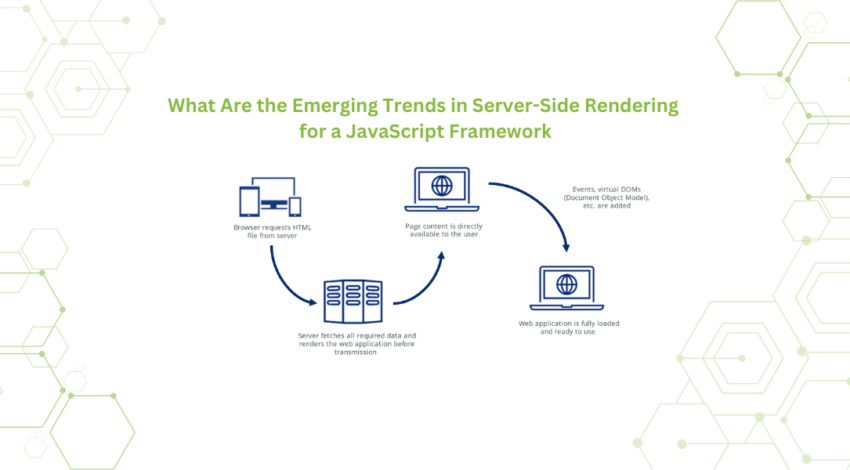
Server-rendered web apps are moving beyond “fetch data on the server, mutate on the client.” Modern frameworks (e.g., Next.js Server Actions, Remix actions, SvelteKit actions, Nuxt server routes) let you trigger mutations directly on the server from UI events—without writing a full REST or GraphQL layer for every operation. The result: fewer moving parts, smaller bundles, and a more secure default. This guide explains the idea, when to use it, and how to avoid common pitfalls.
What are server actions?
A server action is a function that runs on the server and can be called from a form submit or client interaction. The framework handles the wire protocol, serializing form data, invoking the server function, and returning a response. You write a simple function (e.g., createPost(formData)) alongside your server-rendered component and call it from the UI.
Core characteristics:
- Runs on the server (no secrets in the browser).
- Tight coupling to UI: ideal for “submit a form, update the page.”
- Built-in CSRF mitigation via framework conventions (form POST + origin checks).
- Automatic revalidation: frameworks can re-render the page/route with fresh data after a mutation.
Why use server actions?
- Less boilerplate: You avoid crafting endpoints, DTOs, and client fetch code for basic CRUD.
- Smaller bundles: No client-side mutation libraries or extra fetch code for simple forms.
- Security by default: Secrets, tokens, and business logic remain on the server.
- Faster iteration: UI and mutation logic ship together; fewer layers to coordinate.
- Good DX for forms: Native
<form>posts integrate naturally with progressive enhancement.
When server actions are a good fit (and when not)
Great for:
- CRUD on first-party data (create/update/delete records).
- Authenticated dashboard actions (profile updates, settings).
- Admin tools and CMS-like controls.
- Operations with immediate UI feedback and revalidation.
Think twice if:
- You need a public API used by multiple clients (mobile, partner integrations). A real API is still warranted.
- Complex, long-running jobs are common; prefer background queues and webhooks.
- Real-time sync across many clients is essential; pair actions with websockets or a pub/sub layer.
Architectural patterns
1) Forms first, progressive enhancement
Start with HTML forms that post to a server action. Enhance with client-side UX (loading states, optimistic hints) without breaking the form path.
<form action="/actions/createPost" method="post">
  <input name="title" required />
  <textarea name="body" required></textarea>
  <button type="submit">Publish</button>
</form>
2) Co-locate action with data loader
Keep the query (loader) and mutation (action) in the same route/page module. After executing the action, revalidate the loader to show current state.
3) Command/query separation
Keep actions small and intention-revealing:
publishPost(id)archiveConversation(id)rotateApiKey(userId)
Avoid overloading a single “save” action with multiple branches.
4) Validation at the boundary
Validate inputs right where the action receives them—not deep in the codebase. Use a schema (e.g., Zod/Yup) to sanitize and coerce types.
import { z } from "zod";

const PostInput = z.object({
  title: z.string().min(1).max(120),
  body: z.string().min(1),
});

export async function createPost(formData: FormData) {
  const parsed = PostInput.parse({
    title: formData.get("title"),
    body: formData.get("body"),
  });
  // persist to DB...
}
Data revalidation and cache coherence
Mutations must keep the UI honest. Prefer framework utilities that:
- Invalidate the affected route or revalidate tags tied to the data source.
- Trigger a fresh server render so you do not rely on stale client caches.
- Keep pagination and filters intact when reloading.
A predictable pattern:
- Execute action.
- Commit DB changes within a transaction.
- Invalidate cache keys/tags.
- Return a redirect or a revalidated view state.
Error handling and user feedback
- User errors (validation, constraints): Return structured error data mapped to fields; re-fill the form with the user’s inputs.
- System errors (DB down, timeouts): Log with correlation IDs. Show generic errors to users; avoid leaking internals.
- Optimistic UI: Only if the operation is low-risk and easily rolled back; otherwise, show a pending state and rely on revalidation.
Example error shape:
{
  "ok": false,
  "fieldErrors": { "title": "Title is required" },
  "formError": "Unable to publish at this time."
}
Security checklist
- CSRF protection: Use framework-provided form posting and origin checks. For custom fetches, include anti-CSRF tokens.
- Authorization: Never trust client claims. Re-check permissions on the server using the session/user context.
- Rate limiting: Apply per-session or per-IP limits to sensitive actions (password changes, billing).
- Idempotency: For actions prone to double submits (payments, webhooks), store an idempotency key.
- Secrets stay server-side: API keys, signing keys, and third-party tokens should never cross into the client bundle.
Transactions and consistency
Group multi-write operations into a single transaction:
- Update domain records.
- Append audit logs.
- Enqueue background jobs (outbox pattern) to avoid partial success.
If you use caches or edge stores, invalidate within the same transaction boundary or rely on write-through strategies to prevent read-after-write anomalies.
Background work and reliability
Server actions are not job queues. For long tasks:
- Write to DB.
- Enqueue a job (e.g., using a durable queue or serverless task).
- Return immediately with a status ID.
- Poll or subscribe for completion; revalidate the route when done.
This keeps the action responsive and avoids timeouts from edge/server runtimes.
Accessibility and UX
- Use native form semantics: labels,
aria-invalid, and descriptive error text. - Provide clear loading indicators and disable submit while pending.
- Support keyboard and screen reader flows; actions should be reachable without custom JS.
Observability and auditing
Instrument actions like you would an API:
- Structured logs: action name, user ID, correlation ID, latency, result.
- Metrics: success rate, p95 latency, validation failure rate.
- Tracing: tie the action span to DB calls and external requests.
- Audit logs: record who changed what, when, and from where—especially for admin actions.
Testing strategy
- Unit tests: Validate schema parsing and edge cases (empty fields, maximum lengths).
- Integration tests: Hit the action via a real form POST, not just function calls, to cover CSRF and session middleware.
- Contract tests: If multiple pages call the same action, keep a shared test suite to catch regressions.
- Load tests: Confirm actions remain fast under concurrent submits; check DB contention patterns.
Versioning and evolution
Because UI and action live together, refactors are easy—but avoid silent breaking changes:
- Introduce new actions for major behavior changes; deprecate old ones gradually.
- Maintain stable field names for forms and progressive enhancement scripts.
- Document capabilities and limits (file size, rate limits, allowed states).
Anti-patterns to avoid
- Business logic in the client: defeats the purpose and leaks rules.
- Monolithic “doEverything” actions: unclear intent and hard to secure.
- Skipping revalidation: stale UIs cause double submissions and user confusion.
- Leaky errors: stack traces in responses or toasts expose internals.
- Treating actions as a public API: they are app-internal; use proper APIs for third parties.
Migration tips
- Start with low-risk forms (profile updates, preferences).
- Replace bespoke fetch logic with a server action and compare bundle sizes and latency.
- Roll out a standard action template: validation, auth, transaction, cache invalidation, response shape.
- Add observability hooks before scaling usage across the app.
Bottom line
Server actions compress the distance between UI and server logic. For the majority of authenticated, app-internal mutations, they deliver a cleaner code path, stronger security, and simpler caching. Keep inputs validated at the boundary, revalidate aggressively after writes, and reserve full-blown APIs for cases that genuinely need them. Done this way, you’ll ship faster, with fewer layers—and a more reliable user experience.


